
Quick answer: Replacing a single laptop key costs $0–$15 if you do it yourself, or $20–$60 at a repair shop. You almost never need a full keyboard replacement — that’s a separate job that costs $50–$150 for most Windows laptops and $250–$800 for MacBooks, since Apple bundles the keyboard into the entire top case. A single missing or loose key is a $10 fix, not a $150 one, as long as the keyboard mechanism itself is undamaged.
Here’s the full breakdown of what a key replacement actually costs, when you need the whole keyboard instead, and how to do it yourself in under 10 minutes.
Single Key vs. Full Keyboard: Know Which One You Need
This is the single most important distinction, and it’s where most people overspend. A popped-off, cracked, or loose key almost always means one small plastic mechanism failed — not the whole keyboard. Repair shops sometimes push a full keyboard swap because it’s a bigger, easier sale, but it’s rarely necessary.
You need a single key repair if:
- One or a few keys popped off, feel loose, or don’t sit flush
- The keyboard types fine once you press directly on the switch underneath
- Nothing was spilled on the laptop
You need a full keyboard replacement if:
- Multiple keys across different rows have stopped registering
- Liquid was spilled and keys are sticky or unresponsive in a spreading pattern
- The keyboard ribbon cable or internal circuit is damaged
Cost by Repair Type
| Repair | Typical Cost |
|---|---|
| DIY single key (parts only) | $0 – $15 |
| Professional single key repair | $20 – $60 |
| DIY full keyboard replacement (parts only) | $20 – $100 |
| Professional full keyboard replacement (Windows) | $50 – $180 |
| Professional full keyboard replacement (MacBook) | $250 – $800 |
| Basic USB external keyboard (temporary fix) | $20 – $40 |
A single popped-off keycap or retainer clip typically runs a few dollars in parts, while a full keyboard assembly costs significantly more since it includes the entire switch matrix, backlighting, and ribbon connector.
Cost by Laptop Brand (Full Keyboard Replacement)
| Brand | Typical Cost |
|---|---|
| Dell, HP, Lenovo (standard models) | $80 – $180 |
| Budget/generic Windows laptops | $50 – $150 |
| Gaming laptops (mechanical/RGB keyboards) | $150 – $400 |
| MacBook (any recent model) | $250 – $800 |
MacBooks cost the most by far because Apple doesn’t sell the keyboard as a standalone part on most models — a keyboard issue means replacing the entire top case, which includes the trackpad and battery housing.
How to Replace a Single Laptop Key Yourself
Most single-key repairs take under 10 minutes and need no tools beyond your fingers, or at most a small flathead screwdriver.
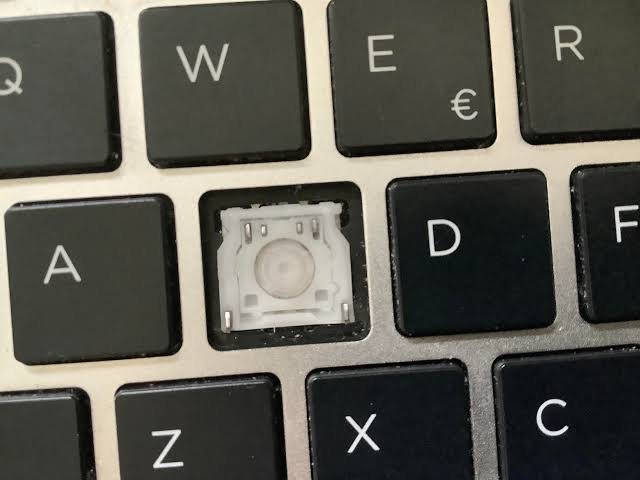
- Identify what’s actually missing. A key has three parts: the keycap (the part you press), a plastic retainer/hinge underneath it, and the rubber dome or scissor switch below that. Check which part is missing or broken before ordering anything.
- Order the exact part for your model. Search “[your laptop model] replacement key” — most listings are $3–$15 and include the keycap plus retainer clip.
- Clean the area with a cotton swab if there’s dust or debris in the switch mechanism.
- Snap the retainer into place first, aligning the small hinge clips with the slots on the keyboard base.
- Press the keycap down evenly until it clicks into place on all sides. Test it a few times before closing the laptop.
If the switch mechanism itself (not just the keycap) is cracked or missing, a single key usually still isn’t worth a full keyboard swap — most sellers offer the switch and keycap together as a matched set for the same low price.
When DIY Isn’t Worth It
- The laptop is still under warranty. Opening it yourself can void coverage that would otherwise cover the repair for free.
- Multiple keys are affected, especially after a liquid spill — that usually points to a keyboard-wide issue, not an isolated key.
- You have a MacBook. Because the keyboard is part of the top case assembly, DIY replacement is a much bigger job involving battery disconnection, and most people are better off going through Apple or an authorized shop.
FAQ
Can you really just buy one replacement key?
Yes. Most laptop keyboards use individually replaceable keycaps and retainer clips, and third-party sellers stock replacement keys for nearly every common laptop model, usually for a few dollars each.
Why did a repair shop quote me for a full keyboard replacement?
A full keyboard swap is easier and faster for a shop to perform and bill than sourcing one exact replacement key, so some shops default to it even when a single key would fix the issue. It’s worth asking specifically whether a single-key repair is possible before approving a full replacement.
Is it cheaper to buy a used laptop keyboard for parts?
Sometimes, especially for older or discontinued models where individual keys are harder to find — a donor keyboard from a broken laptop of the same model can supply several replacement keys.
Will a missing key affect the rest of my laptop?
No, a single missing key doesn’t damage anything else. It’s purely cosmetic and functional for that one key — the rest of the keyboard and laptop continue working normally.