

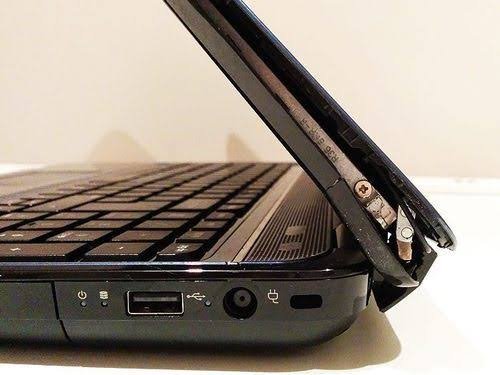
Quick answer: A basic laptop hinge repair typically costs $40–$150 for a simple fix (loose screws, minor realignment), and $150–$400+ if the hinge assembly, back cover, or screen bezel needs replacing. DIY hinge replacement parts alone run $10–$50 if you’re comfortable doing it yourself, while professional shops charge $50–$150 in labor on top of parts. Premium laptops (MacBook, Dell XPS, ThinkPad) tend to land at the higher end because hinges are usually bundled into a full lid assembly rather than sold as a standalone part.
Below is the full cost breakdown by repair type and laptop tier, plus how to tell whether your hinge is a quick fix or a sign of bigger damage. For more hands-on device fixes, check out our full Hardware guides section.
Why Laptop Hinge Repair Costs Vary So Much
The price range is wide because “hinge repair” can mean very different jobs:
- Loose or squeaky hinge — often just needs tightening or a screw replacement. Cheapest fix.
- Cracked or snapped hinge — needs a full hinge replacement, sometimes bundled with the lid cover.
- Hinge pulled away from the casing — usually means the surrounding plastic or metal frame is damaged too, pushing costs higher.
- Screen or cable damage from the break — if the hinge failure stressed the display cables or cracked the screen, that gets added on top.
On many laptops, manufacturers don’t sell the hinge as an isolated $15 part — it comes as part of a complete lid assembly that includes the back cover, antenna cables, and sometimes the webcam housing, which is a big reason repair quotes vary so much between models.
Typical Cost Breakdown
| Repair Type | Typical Cost |
|---|---|
| Minor tightening / screw fix | $25 – $50 |
| Standard single hinge replacement | $40 – $150 |
| Hinge + bezel or back cover replacement | $150 – $300 |
| Hinge + screen or frame damage | $300 – $400+ |
| DIY replacement hinge parts only | $10 – $50 |
| Shop labor (per hour, most U.S. shops) | $50 – $120 |
These figures line up across multiple cost-tracking sources: HomeAdvisor puts a simple hinge repair at $40–$90, rising past $150 when the screen back or bezel needs replacing, while broader repair-cost roundups put the full range at roughly $50–$300 depending on model and damage severity, and can go higher — up to around $400 — on premium laptops needing frame or cable work.
By Laptop Type
- Budget/mainstream laptops (Acer, basic HP/Lenovo): Usually the cheapest to fix, often under $150, since parts are more standardized and easier to source.
- Business laptops (ThinkPad, Latitude, EliteBook): Mid-range costs, typically $150–$300, since hinges are often part of a bundled lid assembly rather than sold separately.
- Premium/ultrabooks (MacBook, XPS, high-end 2-in-1s): Highest costs, frequently $250–$450+, due to precision hinges, thinner chassis designs, and OEM-only parts.
DIY vs Professional: Which Makes Sense?
If you’re comfortable with hands-on fixes, this decision is similar to other device repairs — see our How-To guides for more step-by-step device troubleshooting.
DIY may be worth it if:
- You’re comfortable opening your laptop and handling small screws/cables
- Replacement hinge parts are available for your exact model (check by model number, not just brand)
- The damage is limited to the hinge itself, with no cracked screen or bent frame
- You can find a repair kit for $10–$50 and are willing to accept the risk of voiding any remaining warranty
Professional repair is the safer choice if:
- The hinge break has also affected the screen, display cable, or chassis
- Your laptop is still under manufacturer warranty (self-repair can void it)
- The model uses a bundled lid assembly rather than a standalone hinge, making sourcing and fitting parts more complex
- You’ve never disassembled a laptop before — display cables are easy to damage during a hinge job
When Repair Isn’t Worth It
A rough budgeting rule that repair techs commonly use: if the repair cost is more than about a quarter to half of what a comparable replacement laptop would cost, replacement usually makes more financial sense. A $150 hinge repair on a $1,200 laptop is a reasonable investment; the same $150 repair on an aging $300 laptop often isn’t.
Signs You Need a Repair Now (Don’t Wait)
- The lid feels loose, wobbly, or doesn’t hold its position anymore
- You hear a cracking or grinding sound when opening or closing the lid
- The hinge has visibly separated from the casing
- The screen flickers or the display cuts out when you adjust the screen angle — this can mean the display cable is already being stressed by the broken hinge
Continuing to use a laptop with a damaged hinge risks tearing the display cable or cracking the screen, which turns a $100 fix into a $300+ one. If you notice any of the signs above, it’s worth getting a quote sooner rather than later.
FAQs
Is a laptop hinge repair worth it, or should I replace the laptop?
If the total repair cost stays under roughly a quarter to half of a replacement laptop’s price, repair is usually the more economical choice — especially for laptops that are otherwise in good condition.
Can I fix a laptop hinge myself?
Yes, on many models — replacement hinge parts are often available for $10–$50 online. It’s most reasonable for laptops where the hinge is sold as a standalone part rather than bundled into the full lid assembly, and where you’re comfortable working around display cables.
Does hinge repair void my laptop’s warranty?
Repairs done by an authorized service provider typically preserve your warranty. Self-repair or third-party shop repairs can void remaining warranty coverage on some brands, so it’s worth checking your manufacturer’s policy first.
Why do MacBook and premium laptop hinge repairs cost more?
These models often use hinges integrated into a full lid or display assembly rather than a standalone part, and typically require OEM parts — both of which push labor and parts costs higher than on standard consumer laptops.